Friday, December 17, 2021

Log4Shell Vulnerability - Details

What happened?

On December 9th, 2021, a zero-day exploit in the popular Java logging library “Log4J” (version 2) was discovered and widely publicized. The vulnerability can be used to execute code remotely, by tricking a system into logging a specific malicious string.

More technical details of this vulnerability can be found at this third-party resource

Who is impacted?

Many, many services are vulnerable to this exploit. Cloud services like Steam, Apple iCloud, and apps like Minecraft have already been found to be vulnerable.

An extensive list of responses from impacted organizations has been compiled here.

Anybody using Apache Struts is likely vulnerable. We've seen similar vulnerabilities exploited before in breaches like the 2017 Equifax data breach.

Many Open Source projects like the Minecraft server, Paper, have already begun patching their usage of log4j2.

What is required of app developers?

Version 2.15.0 of the log4j library has been released, without the vulnerability. This release can be downloaded from Apache's official Log4j page, or from your language's package manager (Maven Central for example). App developers must immediately update any apps and integrations that use the Log4J Java library. Failure to do so may result in merchant data being compromised, and will put your application in violation
 
If upgrading is not possible, using the suggested temporary mitigation will also decrease the impact of the vulnerability. Common software solutions that may need patching or reconfiguration include Apache Solr, Apache Lucene, ElasticSearch, and other Java/JVM-based supporting applications

Tuesday, November 02, 2021

Historical places of Haryana and Telangana

Historical places of Haryana

1. Sannihit Sarovar, Location: Thanesar. Lord Vishnu, It is believed to be the meeting point of seven sacred Sarasvatis.

clip_image001

2. Jyotisar, Location: Kurukshetra-Pehowa Road. It is a place where Krishna delivered the Bhagavad Gita to Arjuna.

clip_image002

3. Brahma Sarovar, Location: Thanesar. Ancient water pool sacred to Hinduism. Hinduism lays emphasis on taking bath for internal and external purity

clip_image004

4. Baba Farid Tomb, Location: Faridabad. The shrine is made up of white marble having two gateways, called Nuri Darwaza and Bahishti Darwaza.

clip_image005

5. Nahar Singh Mahal, Location: Ballabhgarh. Its outstanding specimen of architecture. It is also known as Raja Nahar Singh Palace

clip_image006

Historical places of Telangana

1. Golconda Fort, Location: Hyderabad. Situated in the Western part of the beautiful city of Hyderabad at a distance of approximately 9 km from Hussain Sagar Lake.

clip_image007

2. Warangal Fort, Location: Warangal. A prominent landmark of the Telangana state and an apt example of architectural excellence and historical richness of the yore. The major highlights of Warangal fort are the four ornamental gates, which are now the official emblem of the Telangana state

clip_image008

3. Charminar, Location: Hyderabad. An identifying feature of the city, Charminar is the most prominent landmark located right in the heart of Hyderabad. The monument was erected by Quli Qutub Shah to signify the founding of Hyderabad. It is also famous for the market that sprawls around it and is called 'Laad' or 'Chudi' Bazaar.

clip_image009

4. Taj Falaknuma Palace, Location: Hyderabad. Taj Falaknuma Palace is perched around 2000 metres above the city of Hyderabad. Once the royal residence of Nizam- probably the richest man in the world, the palace has now been converted into a five-star luxury heritage hotel

clip_image010

5. Chowmahalla Palace, Location: Hyderabad. Once the seat of the Asaf Jahi dynasty, the Chowmahalla Palace was built in Hyderabad between the years 1857 and 1869. The architecture of the Chowmahalla Palace is an imposing sight to behold. The facade itself is a delicate artwork of domes, arches, windows and meticulously carved out designs.

clip_image011

Saturday, October 30, 2021

Flora and Fauna in Telangana State

Flora and Fauna in Telangana State

Flora is the plant life occurring in a particular region or time, generally the naturally occurring or indigenous—native plant life. Flora, fauna and other forms of life such as fungi are collectively referred to as biota.

Telangana State is known for its rich heritage in biological diversity distributed in 9 agro climatic regions. Among the flora, the state harbours a total of 2,800 taxa belonging to 1,051 genera under 185 families.

Popular flora in Telangana -

Abrus precatorius

clip_image002

Abutilon indicum

clip_image004

Alangium salvifolium

clip_image006 

Barleria cristata

clip_image008

Caesalpinia pulcherrima

clip_image010

Popular fauna in Telangana -

Tiger

clip_image012

Spotted Deer

clip_image014

Barking Deer

clip_image016

Four-horned Antelope - Black buck 

clip_image017

Pangolin

clip_image019

Medical Plants in Telangana

Alstonia Scholaris

clip_image002[1]

Bacopa Monnieri

 clip_image004[1]

Garcinia Indica Choisy

clip_image006[1]

Plantago Ovata

 clip_image008[1]

Climatic conditions and eco system of Telangana

The climate of Hyderabad features an arid climate. The days are hot and dry, usually going up to extreme highs of 40 °C (104 °F), while the nights are cool and breezy. Winds usually bring along clouds of dust, and people prefer staying indoors in the daytime, while the breezes at night are pleasant and clean.

Flora and Fauna in Haryana

Flora is the plant life occurring in a particular region or time, generally the naturally occurring or indigenous—native plant life. Flora, fauna and other forms of life such as fungi are collectively referred to as biota.

A thorny dry deciduous forest, Among the flora, pine and thorny shrubs can be found all over the state. Chief trees are mulberry, eucalyptus, pine, kikar, sheesham and babul, and during the monsoon a carpet of grass covers the hills which makes them excellent grazing ground for black buck and nilgai (blue bull).

Among the flora,

Mulberry

clip_image001

Eucalyptus

 clip_image002

Among the fauna, A lone tiger or panther can be spotted on occasion, while foxes, mongooses, jackals and wild dogs are aplenty.

Tiger

clip_image003

Fox

 clip_image004

Mongoose

clip_image005

Jackals

 clip_image006

Medical Plants in Haryana

MORINGA AMALA

clip_image001[4] clip_image002[4]

GUGGAL

clip_image003[4]

Climatic conditions and eco system of Haryana

Most of the year, the climate of Haryana is of a pronounced continental character, very hot in summer and markedly cold in winter. In between are the pleasant months of spring. The rainfall in the region is low and erratic except in parts of Karnal, Kurukshetra and Ambala Districts.

Saturday, September 18, 2021

“Port 4200 is already in use” - How to Kill Port in Windows

Angular Error - Port 4200 is already in use

Port 4200 is already in use. Use '--port' to specify a different port.
Error: Port 4200 is already in use. Use '--port' to specify a different port.
    at Server.<anonymous> (D:\Nagasai.Works\mobility-ui\node_modules\@angular-devkit\build-angular\src\angular-cli-files\utilities\check-port.js:27:28)
    at Object.onceWrapper (events.js:421:26)
    at Server.emit (events.js:314:20)
    at emitErrorNT (net.js:1343:8)
    at processTicksAndRejections (internal/process/task_queues.js:84:21)

This is what I used to kill the progress on port 4200

Windows users:

Port number 4200 is already in use. Open the cmd as administrator. Type below command after Opening your cmd.exe as administrator to list all active connections running under each local address  with Protocol and  Port number

netstat -a -n -o

Now find port with port number 4200 by right click on terminal and click find, enter 4200 in "find what" and click "find next": Let say you found that port number 4200 is used by pid 79016. Type below command in cmd

taskkill -f /pid 79016

How to fix Error: cannot find module "webpack"

Error on console regarding cannot find module "webpack"

Cannot find module 'webpack'
Require stack:
- D:\Nagasai.Works\vMobile-UI\node_modules\@angular-devkit\build-webpack\src\webpack\index.js

The Cannot find module webpack occurs when webpack is not globally installed. It is a problem with the npm script or application

Here is how we can fix

1. Install webpack in the local app folder

Ensure that you have installed the latest version of the webpack by running:
npm install webpack

2. Link webpack to your project

If the above solution does not work, try linking a globally installed webpack to your project. In your project, open the terminal, and type

npm link webpack

Sunday, July 18, 2021

10 Best Torrent Sites That Are Still Working

Below are the list of best torrent sites still on the market, and you can access any one of them to find your favorite files. However, each of them has different advantages (and in some cases disadvantages), so we’ll take a deep dive into your options to see which website suits you best.
  1. The Pirate Bay – Best overall torrent site (Mirror sites - thepiratebay.vip, thepirate-bay.org, thepiratebay.rocks)
  2. RARBG – Great torrent site with an active community (Mirror sites - rarbg.is, rarbgunlock.com, rarbgmirror.com) 
  3. 1337X – Awesome torrent site for movies, tv-series and music (Mirror sites - 1337x.st (Active since Oct. 2017), x1337x.ws (Active since Dec. 2017), x1337x.eu (Active since Mar. 2018), x1337x.se (Active since May. 2018), 1337x.is (Active since Jan. 2019), 1337x.gd (Active since Oct. 2019)
  4. Torrentz2 – The best choice for music torrents (Mirror sites - torrentz2eu.org (the one we used), torrentz.eu)
  5. YTS – Our recommended torrent website to download HD movies (Mirror sites - yts.am, yts.pm, yts.gm, best part of this site is never taken down)
  6. EZTV – Torrent site that focuses on TV shows (Mirror sites - eztv.unblocked.llc, eztv1.unblocked.is, eztv1.unblocked.si )
  7. Zooqle – A heavenly torrent site for gamers (Mirror sites - zooqle.g2g.casa, zooqle.nocensor.club, zooqle.u4m.pw)
  8. LimeTorrents – Superb torrent site for new releases (Mirror sites - limetorrents.asia, limetorrents.zone, limetorrents.co, limetor.com, limetor.pro)
  9. Torrends.to – A unique torrent website that combines the best of other sites (Mirror sites - Not available)
  10. TorrentDownloads – Good torrent site for obscure and forgotten titles  - Mirror sites - torrentdownloads.unblockproject.uno, torrentdownloads.123unblock.cyou, torrentdownloads.mrunblock.cyou, torrentdownloads.nocensor.club).
Happy Torrenting๐Ÿ‘


Wednesday, July 07, 2021

The Achievements of India in the field of Science and Technology

India has been the most famous country in the world since ancient times, however, after its slavery, India lost its identity and strength. After achieving independence in 1947, India has started reclaiming its lost strength and identity in the crowd. It was only science and technology, which has given India its true identity throughout the world.

India has now become a rapidly developing country through its new inventions in the field of science and advanced technology.

Scientific revolutions caught their full speed in the 20th century and became even more advanced in the 21st century

Some of Major achievements that India made from last century till day

1. Development of an atomic clock has made ISRO one of the few space organizations in the world to have gained this sophisticated technology. ISRO has developed an atomic clock that will be used in navigation satellites to measure precise location data

2.A team of Indian astronomers has discovered an extremely large supercluster of galaxies. This is one of the largest known structures in the neighborhood of the universe - as big as 20 million billion suns. It is a path-breaking discovery and the cluster has been named 'Saraswati'.

3. ISRO demonstrated its capability of handling complex missions by successfully launching a record 104 satellites on a single rocket. This is the highest number of satellites ever launched in a single mission by any other country in the world

4. Aryabhatta - the first unmanned satellite built by India was a breakthrough achievement in India's space programme. Aryabhata was built by the Indian Space Research Organization to conduct experiments in X-ray astronomy, aeronomics, and solar physics and opened new possibilities for ISRO

5. The Mars Orbiter Mission made India the only nation in the world to reach Mars in its first attempt. Mangalyaan-1, the indigenously built space probe marked India's first venture into the interplanetary space. It also made India first in Asia, and fourth in the world to reach the surface of Mars

India is a land where numerous brilliant brains have made contribution in the field of science and technology and enhanced its position around the globe.

To name few brilliant brains, these people has contributed in field of since and technology.

C.V. Raman was one of the most famous scientists of India as ever produced.

Vikram Sarabhai was among distinguished scientists of India. He is considered as the Father of the Indian space program.

Sir Mokshagundam Visvesvaraya was a notable Indian engineer

Dr APJ Abdul Kalam is remembered as a great scientist, an inspirational leader and an extraordinary human being.

India is a beautiful country and I love my country and I also feel blessed to be its part.

Thursday, June 24, 2021

How to enable View Current Requests in IIS

View Current Request in IIS enables to displays the current running requests in a worker process. Several fields provide data to investigate performance issues; for example, the URL, Client IP, Pipeline Module State and Module Name, and the Time Elapsed for a request.

Here is how it can be done. 
  1. To enable the View Current Requests action in the Worked Processes feature, the Request Monitor feature must be enabled. The following steps are typical among later Windows operating systems:
    1. Open the Server Manager.
    2. Select Roles and locate the Web Server (IIS) role.
    3. Click Add Role Services .
    4. Locate the Health and Diagnostics section then select Request Monitor .
    5. Click Next and complete the wizard.
  2. Once enabled, open IIS Manager and select the Web server.
  3. In the Web Server Home Features view, go to the IIS section and select and open the Worker Processes feature.
  4. Select the Desired worker process then, in the Actions pane, click View Current Requests (or right-click on the Worker Process and select View Current Requests 


Hope this helps ๐Ÿ˜€!!

How to View Running Web Requests in IIS


When website performance suddenly becomes worse, there may be many potential causes. Gathering information about the current requests being handled by the worker process can help to identify issues impacting performance.

The Internet Information Services (IIS) Manager provides a server-level Worker Processes feature that manages "a list of worker processes running in application pools on a Web server." The information provided includes the Application Pool Name, Process ID, State of the process, CPU percentage, Private Bytes, and Virtual Bytes

Additionally, if enabled, the View Current Requests action is available. The View Current Requests displays the current running requests in a worker process. Several fields provide data to investigate performance issues; for example, the URL, Client IP, Pipeline Module State and Module Name, and the Time Elapsed for a request.

Although, this may also show a bunch of web requests that are queued up and not directly lead you to the root cause.

One of the first things you should do is see which web requests are currently executing. This may help you identify a specific URL that is causing the problem.

Via the IIS User Interface

Via the IIS management console, you can view the running worker processes. You can view which IIS application pool is causing high CPU and view the currently running web requests.


After selecting “Worker Processes” from the main IIS menu, you can see the currently 
running IIS worker processes.


If you double-click on a worker process, you can see all of the currently executing requests.

Here’s an example from one of our servers. You can see that each request is in different parts of the ASP.NET pipeline and currently executing different HTTP modules.

SSDT for Visual Studio 2019

Install SSDT with Visual Studio 2019

If Visual Studio 2019 is already installed, you can edit the list of workloads to include SSDT. If you don’t have Visual Studio 2019 installed, then you can download and install Visual Studio 2019 Community

To modify the installed Visual Studio workloads to include SSDT, use the Visual Studio Installer.

For Analysis Services, Integration Services, or Reporting Services projects, you can install the appropriate extensions from within Visual Studio with Extensions > Manage Extensions or from the Marketplace.

Installing Visual Studio 2019

To download Visual Studio 2019 we will use the following link.

Wednesday, June 23, 2021

SSDT for Visual Studio 2017

Starting with Visual Studio 2017, the functionality of creating Database Projects has been integrated into the Visual Studio installation. There's no need to install the SSDT standalone installer for the core SSDT experience.

Now to create Analysis Services, Integration Services, or Reporting Services projects, you still need the SSDT standalone installer.

Install Analysis Services, Integration Services, and Reporting Services tools

To install Analysis Services, Integration Services, and Reporting Services project support, run the SSDT standalone installer.

The installer lists available Visual Studio instances to add SSDT tools. If Visual Studio isn't already installed, selecting Install a new SQL Server Data Tools instance installs SSDT with a minimal version of Visual Studio, but for the best experience, we recommend using SSDT with the latest version of Visual Studio


Tuesday, June 15, 2021

Telegna & Harayana festivals -เฐฌเฐคుเฐ•เฐฎ్เฐฎ & เฐฌోเฐจాเฐฒు

เฐฌเฐคుเฐ•เฐฎ్เฐฎ เฐชంเฐกుเฐ— เฐคెเฐฒంเฐ—ాเฐฃా เฐฐాเฐท్เฐŸ్เฐฐเฐฎుเฐฒోเฐจి เฐ†เฐถ్เฐตเฐฏుเฐœ เฐฎాเฐธ เฐถుเฐฆ్เฐง เฐชాเฐก్เฐฏเฐฎి เฐจుంเฐกి เฐคొเฐฎ్เฐฎిเฐฆి เฐฐోเฐœుเฐฒ เฐชాเฐŸు เฐœเฐฐుเฐชుเฐ•ుంเฐŸాเฐฐు. เฐˆ เฐฌเฐคుเฐ•เฐฎ్เฐฎ (เฐ—ౌเฐฐి) เฐชంเฐกుเฐ— เฐฒేเฐฆా เฐธเฐฆ్เฐฆుเฐฒ เฐชంเฐกుเฐ— เฐฆเฐธเฐฐాเฐ•ి เฐฐెంเฐกు เฐฐోเฐœుเฐฒ เฐฎుంเฐฆు เฐตเฐธ్เฐคుంเฐฆి.  เฐคెเฐฒంเฐ—ాเฐฃ เฐช్เฐฐเฐค్เฐฏేเฐ• เฐฐాเฐท్เฐŸ్เฐฐం เฐเฐฐ్เฐชเฐกిเฐจ เฐคเฐฐుเฐตాเฐค เฐฌเฐคుเฐ•เฐฎ్เฐฎเฐจు เฐฐాเฐท్เฐŸ్เฐฐ เฐชంเฐกుเฐ—เฐ—ా เฐจిเฐฐ్เฐตเฐนిเฐธ్เฐคుเฐจ్เฐจాเฐฐు

เฐคొเฐฎ్เฐฎిเฐฆి เฐฐోเฐœుเฐฒ เฐฌเฐคుเฐ•เฐฎ్เฐฎ เฐจైเฐตేเฐฆ్เฐฏాเฐฒు

9เฐฐోเฐœుเฐฒเฐชాเฐŸు เฐช్เฐฐเฐคిเฐฐోเฐœూ เฐ“ เฐฐเฐ•เฐฎైเฐจ เฐจైเฐตేเฐฆ్เฐฏం เฐธเฐฎเฐฐ్เฐชిเฐธ్เฐคాเฐฐు. เฐฎొเฐฆเฐŸి เฐŽเฐจిเฐฎిเฐฆి เฐฐోเฐœుเฐฒు เฐˆ เฐจైเฐตేเฐฆ్เฐฏం เฐคเฐฏాเฐฐీเฐฒో เฐฏుเฐตเฐ•ుเฐฒు, เฐฏుเฐตเฐคుเฐฒు เฐชాเฐฒ్เฐ—ొంเฐŸాเฐฐు. เฐšిเฐตเฐฐిเฐฐోเฐœు เฐธเฐฆ్เฐฆుเฐฒ เฐฌเฐคుเฐ•เฐฎ్เฐฎ เฐ…ంเฐŸాเฐฐు. เฐˆเฐฐోเฐœు เฐฎాเฐค్เฐฐం เฐจైเฐตేเฐฆ్เฐฏాเฐจ్เฐจి เฐฎเฐนిเฐณเฐฒు เฐคเฐฏాเฐฐు เฐšేเฐธ్เฐคాเฐฐు.

1. เฐŽంเฐ—ిเฐฒి เฐชూเฐฒ เฐฌเฐคుเฐ•เฐฎ్เฐฎ: เฐฎเฐนా เฐ…เฐฎเฐตాเฐธ్เฐฏเฐฐోเฐœు เฐฌเฐคుเฐ•เฐฎ్เฐฎ เฐฎొเฐฆเฐŸిเฐฐోเฐœు เฐตేเฐกుเฐ• เฐฎొเฐฆเฐฒเฐตుเฐคుంเฐฆి. เฐคెเฐฒంเฐ—ాเฐฃเฐฒో เฐฆీเฐจ్เฐจి เฐชెเฐค్เฐฐాเฐฎเฐธ เฐ…เฐจి เฐ•ూเฐกా เฐ…ంเฐŸాเฐฐు. เฐจుเฐต్เฐตుเฐฒు, เฐฌిเฐฏ్เฐฏంเฐชింเฐกి, เฐจూเฐ•เฐฒు เฐ•เฐฒిเฐชి เฐจైเฐตేเฐฆ్เฐฏం เฐคเฐฏాเฐฐు เฐšేเฐธ్เฐคాเฐฐు.

2. เฐ…เฐŸుเฐ•ుเฐฒ เฐฌเฐคుเฐ•เฐฎ్เฐฎ : เฐ†เฐถ్เฐตเฐฏుเฐœ เฐถుเฐฆ్เฐง เฐชాเฐก్เฐฏเฐฎి เฐจాเฐกు เฐšేเฐธ్เฐคాเฐฐు. เฐธเฐช్เฐชిเฐกి เฐชเฐช్เฐชు, เฐฌెเฐฒ్เฐฒం, เฐ…เฐŸుเฐ•ుเฐฒเฐคో เฐจైเฐตేเฐฆ్เฐฏం เฐคเฐฏాเฐฐు เฐšేเฐธి เฐ…เฐฎ్เฐฎเฐตాเฐฐిเฐ•ి เฐธเฐฎเฐฐ్เฐชిเฐธ్เฐคాเฐฐు.

3. เฐฎుเฐฆ్เฐฆเฐชเฐช్เฐชు เฐฌเฐคుเฐ•เฐฎ్เฐฎ : เฐฎుเฐฆ్เฐฆเฐชเฐช్เฐชు, เฐชాเฐฒు, เฐฌెเฐฒ్เฐฒంเฐคో เฐจైเฐตేเฐฆ్เฐฏం เฐคเฐฏాเฐฐు เฐšేเฐธి เฐธเฐฎเฐฐ్เฐชిเฐธ్เฐคాเฐฐు.

4. เฐจాเฐจే เฐฌిเฐฏ్เฐฏం เฐฌเฐคుเฐ•เฐฎ్เฐฎ : เฐจాเฐจేเฐธిเฐจ เฐฌిเฐฏ్เฐฏం, เฐชాเฐฒు, เฐฌెเฐฒ్เฐฒం เฐ•เฐฒిเฐชి เฐจైเฐตేเฐฆ్เฐฏం เฐšేเฐธ్เฐคాเฐฐు.

5. เฐ…เฐŸ్เฐฒ เฐฌเฐคుเฐ•เฐฎ్เฐฎ : เฐ…เฐŸ్เฐฒు เฐฒేเฐฆా เฐฆోเฐถ เฐจైเฐตేเฐฆ్เฐฏంเฐ—ా เฐธเฐฎเฐฐ్เฐชిเฐธ్เฐคాเฐฐు.

6. เฐ…เฐฒిเฐ—ిเฐจ เฐฌเฐคుเฐ•เฐฎ్เฐฎ : เฐˆเฐฐోเฐœు เฐ†เฐถ్เฐตเฐฏుเฐœ เฐชంเฐšเฐฎి. เฐจైเฐตేเฐฆ్เฐฏเฐฎేเฐฎి เฐธเฐฎเฐฐ్เฐชింเฐšเฐฐు.

7. เฐตేเฐชเฐ•ాเฐฏเฐฒ เฐฌเฐคుเฐ•เฐฎ్เฐฎ : เฐฌిเฐฏ్เฐฏంเฐชింเฐกిเฐจి เฐฌాเฐ—ా เฐตేเฐฏింเฐšి เฐตేเฐชเฐชంเฐก్เฐฒుเฐ—ా เฐคเฐฏాเฐฐు เฐšేเฐธి เฐจైเฐตేเฐฆ్เฐฏంเฐ—ా เฐธเฐฎเฐฐ్เฐชిเฐธ్เฐคాเฐฐు.

8. เฐตెเฐจ్เฐจเฐฎుเฐฆ్เฐฆเฐฒ เฐฌเฐคుเฐ•เฐฎ్เฐฎ : เฐจుเฐต్เฐตుเฐฒు, เฐตెเฐจ్เฐจ เฐฒేเฐฆా เฐจెเฐฏ్เฐฏి เฐฌెเฐฒ్เฐฒం เฐ•เฐฒిเฐชి เฐจైเฐตేเฐฆ్เฐฏం เฐคเฐฏాเฐฐు เฐšేเฐธ్เฐคాเฐฐు.

9. เฐธเฐฆ్เฐฆుเฐฒ เฐฌเฐคుเฐ•เฐฎ్เฐฎ : เฐ†เฐถ్เฐตเฐฏుเฐœ เฐ…เฐท్เฐŸเฐฎి เฐจాเฐกు เฐ†เฐฆేเฐฐోเฐœు เฐฆుเฐฐ్เฐ—ాเฐท్เฐŸเฐฎిเฐจి เฐœเฐฐుเฐชుเฐ•ుంเฐŸాเฐฐు. เฐเฐฆుเฐฐเฐ•ాเฐฒ เฐจైเฐตేเฐฆ్เฐฏాเฐฒు เฐคเฐฏాเฐฐు เฐšేเฐธ్เฐคాเฐฐు. เฐชెเฐฐుเฐ—เฐจ్เฐจం, เฐšింเฐคเฐชంเฐกు เฐชుเฐฒిเฐนోเฐฐ, เฐฒెเฐฎเฐจ్‌ เฐฐైเฐธ్‌, เฐ•ొเฐฌ్เฐฌเฐฐเฐจ్เฐจం, เฐจుเฐต్เฐตుเฐฒเฐจ్เฐจం.

clip_image001[4]

เฐฌเฐคుเฐ•เฐฎ్เฐฎ เฐธంเฐฌเฐฐాเฐฒు

เฐคొเฐฎ్เฐฎిเฐฆిเฐฐోเฐœుเฐฒు เฐธเฐฎเฐฐ్เฐชింเฐšే เฐจైเฐตేเฐฆ్เฐฏాเฐฒเฐฒో เฐฎొเฐ•్เฐ•เฐœొเฐจ్เฐจเฐฒు, เฐœొเฐจ్เฐจเฐฒు, เฐธเฐœ్เฐœเฐฒు, เฐฎిเฐจుเฐฎుเฐฒు, เฐถเฐจเฐ—เฐฒు, เฐชెเฐธเฐฐ్เฐฒు, เฐชเฐฒ్เฐฒీเฐฒు, เฐจుเฐต్เฐตుเฐฒు, เฐ—ోเฐงుเฐฎเฐฒు, เฐฌిเฐฏ్เฐฏం, เฐ•ాเฐœు, เฐฌెเฐฒ్เฐฒం, เฐชాเฐฒు เฐ‰เฐชเฐฏోเฐ—ిเฐธ్เฐคాเฐฐు.

เฐฌోเฐจాเฐฒు

เฐฌోเฐจాเฐฒు เฐ…เฐฎ్เฐฎเฐตాเฐฐుเฐจి เฐชూเฐœింเฐšే เฐนింเฐฆుเฐตుเฐฒ เฐชంเฐกుเฐ—. เฐˆ เฐชంเฐกుเฐ— เฐช్เฐฐเฐงాเฐจంเฐ—ా เฐนైเฐฆเฐฐాเฐฌాเฐฆు, เฐธిเฐ•ింเฐฆ్เฐฐాเฐฌాเฐฆు, เฐคెเฐฒంเฐ—ాเฐฃ, เฐฐాเฐฏเฐฒเฐธీเฐฎเฐฒోเฐจి เฐ•ొเฐจ్เฐจి เฐช్เฐฐాంเฐคాเฐฒเฐฒో เฐœเฐฐుเฐชుเฐ•ోเฐฌเฐกుเฐคుంเฐฆి. เฐธాเฐงాเฐฐเฐฃంเฐ—ా เฐœూเฐฒై เฐฒేเฐ• เฐ†เฐ—เฐท్เฐŸుเฐฒో เฐตเฐš్เฐšు เฐ†เฐทాเฐข เฐฎాเฐธంเฐฒో เฐˆ เฐชంเฐกుเฐ—เฐจు เฐœเฐฐుเฐชుเฐ•ుంเฐŸాเฐฐు. เฐชంเฐกుเฐ— เฐฎొเฐฆเฐŸి, เฐšిเฐตเฐฐి เฐฐోเฐœుเฐฒเฐฒో เฐŽเฐฒ్เฐฒเฐฎ్เฐฎ เฐฆేเฐตిเฐ•ి เฐช్เฐฐเฐค్เฐฏేเฐ• เฐชూเฐœเฐฒు เฐšేเฐธ్เฐคాเฐฐు

เฐญోเฐœเฐจం เฐ…เฐจి เฐ…เฐฐ్เฐฅం เฐ•เฐฒిเฐ—ిเฐจ เฐฌోเฐจం เฐฆేเฐตిเฐ•ి เฐธเฐฎเฐฐ్เฐชింเฐšే เฐจైเฐตేเฐฆ్เฐฏం. เฐฎเฐนిเฐณเฐฒు เฐตంเฐกిเฐจ เฐ…เฐจ్เฐจంเฐคో เฐชాเฐŸు เฐชాเฐฒు, เฐชెเฐฐుเฐ—ు, เฐฌెเฐฒ్เฐฒం, เฐ•ొเฐจ్เฐจిเฐธాเฐฐ్เฐฒు เฐ‰เฐฒ్เฐฒిเฐชాเฐฏเฐฒเฐคో เฐ•ూเฐกిเฐจ เฐฌోเฐจాเฐจ్เฐจి เฐฎเฐŸ్เฐŸి เฐฒేเฐ• เฐฐాเฐ—ి เฐ•ుంเฐกเฐฒเฐฒో เฐคเฐฎ เฐคเฐฒ เฐชై เฐชెเฐŸ్เฐŸుเฐ•ుเฐจి, เฐกเฐช్เฐชుเฐ—ాเฐณ్เฐณు, เฐ†เฐŸเฐ—ాเฐณ్เฐณు เฐคోเฐก్เฐ•ొเฐจి เฐฐాเฐ—ా เฐฆేเฐตి เฐ—ుเฐกిเฐ•ి เฐตెเฐณ్เฐคాเฐฐు. เฐฎเฐนిเฐณเฐฒు เฐคీเฐธుเฐ•ెเฐณ్เฐณే เฐˆ เฐฌోเฐจాเฐฒ เฐ•ుంเฐกเฐฒเฐจు เฐšిเฐจ్เฐจ เฐตేเฐช เฐฐెเฐฎ్เฐฎเฐฒเฐคో, เฐชเฐธుเฐชు, เฐ•ుంเฐ•ుเฐฎ เฐฒేเฐ• เฐ•เฐกి (เฐคెเฐฒ్เฐฒ เฐฎుเฐ—్เฐ—ు) เฐคో เฐ…เฐฒంเฐ•เฐฐింเฐšి, เฐฆాเฐจిเฐชై เฐ’เฐ• เฐฆీเฐชం เฐ‰ంเฐšเฐกం เฐ•เฐฆ్เฐฆు. เฐฎైเฐธเฐฎ్เฐฎ, เฐชోเฐšเฐฎ్เฐฎ, เฐŽเฐฒ్เฐฒเฐฎ్เฐฎ, เฐชెเฐฆ్เฐฆเฐฎ్เฐฎ, เฐกొเฐ•్เฐ•ాเฐฒเฐฎ్เฐฎ, เฐ…ంเฐ•ాเฐฒเฐฎ్เฐฎ, เฐชోเฐฒేเฐฐเฐฎ్เฐฎ, เฐฎాเฐฐెเฐฎ్เฐฎ เฐฎుเฐจ్เฐจเฐ—ు เฐชేเฐฐ్เฐฒు เฐ•เฐฒ เฐˆ เฐฆేเฐตి เฐ—ుเฐณ్เฐณเฐจు เฐฆేเฐฆీเฐช్เฐฏเฐฎాเฐจంเฐ—ా เฐ…เฐฒంเฐ•เฐฐిเฐธ్เฐคాเฐฐు.

เฐฎเฐจ เฐคెเฐฒంเฐ—ాเฐฃ เฐชంเฐกుเฐ—เฐฒเฐฒో เฐฌోเฐจాเฐฒ เฐชంเฐกుเฐ— เฐ•ూเฐกా เฐ’เฐ•เฐŸి. เฐคెเฐฒంเฐ—ాเฐฃ เฐช్เฐฐเฐœเฐฒు เฐšాเฐฒా เฐธంเฐคోเฐทంเฐ—ా เฐœเฐฐుเฐชుเฐ•ుเฐจే เฐชంเฐกుเฐ—. เฐฎుเฐ–్เฐฏంเฐ—ా เฐฎเฐจ เฐญాเฐ—్เฐฏเฐจเฐ—เฐฐం (เฐนైเฐฆเฐฐాเฐฌాเฐฆ్), เฐฒเฐธ్เฐ•เฐฐ్ (เฐธిเฐ•ింเฐฆ్เฐฐాเฐฌాเฐฆ్) เฐœంเฐŸ เฐจเฐ—เฐฐాเฐฒ్เฐฒో เฐœเฐฐిเฐ—ే เฐฌోเฐจాเฐฒ เฐชంเฐกుเฐ— เฐ…ంเฐ—เฐฐంเฐ—เฐตైเฐญเฐตంเฐ—ా เฐœเฐฐుเฐ—ుเฐคుంเฐฆి. เฐ…ంเฐฆుเฐ•ే เฐฎเฐจ เฐคెเฐฒంเฐ—ాเฐฃ เฐช్เฐฐเฐญుเฐค్เฐตం เฐฌోเฐจాเฐฒ เฐชంเฐกుเฐ—เฐจు เฐฐాเฐท్เฐŸ్เฐฐ เฐชంเฐกుเฐ—เฐ—ా เฐ—ుเฐฐ్เฐคింเฐšింเฐฆి.เฐฎొเฐฆเฐŸ เฐ—ోเฐฒ్เฐ•ొంเฐก เฐœเฐ—เฐฆాంเฐฌిเฐ• เฐ†เฐฒเฐฏంเฐฒో เฐช్เฐฐాเฐฐంเฐฌเฐฎై เฐคเฐฐుเฐตాเฐค เฐธిเฐ•ింเฐฆ్เฐฐాเฐฌాเฐฆ్ เฐ‰เฐœ్เฐœเฐฏిเฐจి เฐฎเฐนంเฐ•ాเฐณి เฐ†เฐฒเฐฏంเฐฒో เฐฌోเฐจాเฐฒ เฐชంเฐกుเฐ—ాเฐจు เฐจిเฐฐ్เฐตเฐนిเฐธ్เฐคాเฐฐు เฐ†เฐคเฐฐుเฐตాเฐค เฐšిเฐตเฐฐเฐ—ా เฐฒాเฐฒ్ เฐฆเฐฐ్เฐตాเฐœ เฐธింเฐนเฐตాเฐนిเฐจి เฐ†เฐฒเฐฏంเฐฒో, เฐ‡เฐคเฐฐ เฐšోเฐŸ్เฐฒ เฐจిเฐฐ్เฐตเฐนిเฐธ్เฐคాเฐฐు เฐ†เฐทాเฐขเฐฎాเฐธంเฐฒో เฐˆ เฐฌోเฐจాเฐฒ เฐชంเฐกుเฐ— เฐคెเฐฒంเฐ—ాเฐฃ เฐช్เฐฐాంเฐคాเฐฒเฐฒో เฐ†เฐจంเฐฆంเฐ—ా เฐœเฐฐుเฐชుเฐ•ుంเฐŸాเฐฐు

เฐฌోเฐจాเฐฒ เฐชంเฐกుเฐ— เฐ•ు เฐ—เฐฒ เฐถాเฐธ్เฐค్เฐฐీเฐฏ เฐ•ాเฐฐเฐฃాเฐฒు


เฐ†เฐทాเฐข เฐฎాเฐธంเฐฒో เฐชంเฐกเฐ— เฐŽంเฐฆుเฐ•ు เฐšేเฐธ్เฐคాเฐฐు

เฐฎเฐจเฐ•ు เฐฎుเฐ–్เฐฏంเฐ— เฐตాเฐจా เฐ•ాเฐฒం เฐ†เฐทాเฐข เฐฎాเฐธంเฐฒో เฐฎొเฐฆเฐฒై เฐถ్เฐฐాเฐตเฐฃ เฐฎాเฐธం เฐญเฐฆ్เฐฐเฐชเฐฆ เฐฎాเฐธంเฐฒో เฐฎుเฐ—ుเฐธ్เฐคుంเฐฆి. เฐตాเฐจాเฐ•ాเฐฒంเฐฒో เฐฎเฐจเฐ•ు เฐ•เฐฒเฐฐా,เฐฎเฐฒేเฐฐిเฐฏా เฐตంเฐŸి เฐ…ంเฐŸు เฐต్เฐฏాเฐงుเฐฒు เฐšాเฐฒ เฐค్เฐตเฐฐเฐ— เฐต్เฐฏాเฐชిเฐธ్เฐคాเฐฏి .เฐตాเฐจా เฐ•ాเฐฒంเฐฒో เฐตเฐš్เฐšే เฐ…ంเฐŸూ เฐต్เฐฏాเฐงుเฐฒు เฐšాเฐฒా เฐช్เฐฐเฐฎాเฐฆเฐ•เฐฐం.เฐธాเฐงాเฐฐเฐฃంเฐ—ా เฐˆ เฐ…ంเฐŸు เฐต్เฐฏాเฐงుเฐฒు เฐ•్เฐฐిเฐฎి เฐ•ీเฐŸเฐ•ాเฐฒเฐคో เฐชాเฐŸు เฐ‡เฐคเฐฐ เฐช్เฐฐเฐฎాเฐฆ เฐœంเฐคుเฐตుเฐคో เฐตเฐš్เฐšే เฐช్เฐฐเฐฎాเฐฆంเฐ•ూเฐกా เฐ‰ంเฐฆి.เฐ…ంเฐฆుเฐตเฐฒ్เฐฒ เฐ†เฐทాเฐข เฐฎాเฐธంเฐฒో เฐˆ เฐฌోเฐจాเฐฒ เฐชంเฐกుเฐ— เฐœเฐฐుเฐชుเฐ•ుంเฐŸాเฐฐు

เฐ—ుเฐ—్เฐ—ీเฐฒం เฐฒేเฐฆా เฐฎైเฐธాเฐšి เฐชొเฐ—

เฐ…เฐฎ్เฐฎเฐตాเฐฐి เฐŠเฐฐేเฐ—ింเฐชు เฐธเฐฎเฐฏంเฐฒో เฐ…เฐฎ్เฐฎเฐตాเฐฐిเฐ•ి เฐ—ుเฐ—్เฐ—ీเฐฒం เฐฒేเฐฆా เฐฎైเฐธాเฐšి เฐชొเฐ— เฐตేเฐธ్เฐคాเฐฐు.เฐ‡ంเฐคเฐ•ు เฐชొเฐ— เฐŽంเฐฆుเฐ•ు เฐตేเฐธ్เฐคాเฐฐంเฐŸే.เฐตాเฐจా เฐ•ాเฐฒంเฐฒో เฐฆోเฐฎเฐฒు, เฐ‡เฐคเฐฐ เฐ•ీเฐŸเฐ•ాเฐฒు เฐšాเฐฒ เฐต్เฐฏాเฐชిเฐธ్เฐคాเฐฏి . เฐ…เฐช్เฐชుเฐกు เฐ† เฐชొเฐ— เฐตเฐฒ్เฐฒ เฐ…เฐŸుเฐตంเฐŸి เฐ•్เฐฐిเฐฎి เฐ•ీเฐŸเฐ•ాเฐฒు เฐšเฐจిเฐชోเฐคాเฐฏి เฐ…ంเฐฆుเฐตเฐฒเฐจ เฐ…เฐฎ్เฐฎเฐตాเฐฐిเฐ•ి เฐฎైเฐธాเฐšి เฐฒేเฐฆా เฐ—ుเฐ—్เฐ—ిเฐฒం เฐชొเฐ—เฐฒు เฐตేเฐธ్เฐคాเฐฐు

เฐฒోเฐน్เฐฐి

เฐ‰เฐค్เฐธเฐนเฐชూเฐฐిเฐคเฐฎైเฐจ เฐฐాเฐท్เฐŸ్เฐฐాเฐฒ్เฐฒో เฐฎుంเฐฆుంเฐกే เฐชంเฐœాเฐฌ్ เฐฎเฐฐిเฐฏు เฐนเฐฐ్เฐฏాเฐจా เฐฐాเฐท్เฐŸ్เฐฐాเฐฒు, เฐฒోเฐน్เฐฐి เฐ…เฐจే เฐต్เฐฏเฐตเฐธాเฐฏాเฐจిเฐ•ి เฐธంเฐฌంเฐงింเฐšిเฐจ เฐชంเฐกుเฐ—เฐจు เฐœเฐฐుเฐชుเฐ•ుంเฐŸాเฐฏి.

เฐฒోเฐน్เฐฐి เฐ…เฐจే เฐชเฐฆం เฐ‰เฐฆ్เฐญเฐตింเฐšเฐกం เฐตెเฐจుเฐ• เฐŽเฐจ్เฐจో เฐ•เฐฅเฐฒు เฐ‰เฐจ్เฐจాเฐฏి. เฐˆ เฐชเฐฆం ' เฐฒోเฐน్ ' เฐ…เฐจే เฐชเฐฆం เฐคో เฐ‰เฐฆ్เฐญเฐตింเฐšింเฐฆเฐจి เฐ’เฐ• เฐ•เฐฅ เฐช్เฐฐเฐšాเฐฐంเฐฒో เฐ‰ంเฐฆి. ' เฐฒోเฐน్ ' เฐ…ంเฐŸే เฐ‡เฐจుเฐฎు เฐ…เฐจి เฐ…เฐฐ్เฐงం. เฐฎంเฐฆเฐฎైเฐจ เฐ‡เฐจుเฐฎు เฐฌాంเฐกీเฐฒเฐจు เฐชంเฐกుเฐ— เฐธంเฐฆเฐฐ్เฐญంเฐ—ా เฐฐเฐ•เฐฐเฐ•ాเฐฒ เฐฎเฐธాเฐฒాเฐฒు เฐคเฐฏాเฐฐుเฐšేเฐฏเฐกంเฐฒో เฐญాเฐ—ంเฐ—ా เฐ‰เฐชเฐฏోเฐ—ిเฐธ్เฐคుంเฐŸాเฐฐు. เฐ‡เฐ•్เฐ•เฐกి เฐจుంเฐกే เฐˆ เฐชంเฐกుเฐ—เฐ•ు เฐˆ เฐชేเฐฐు เฐตเฐš్เฐšింเฐฆเฐจి เฐšెเฐฌుเฐคాเฐฐు. เฐœాเฐจเฐชเฐฆ เฐ•เฐฅเฐฒు เฐšెเฐช్เฐชేเฐตాเฐฐు เฐฎాเฐค్เฐฐం เฐชూเฐฐ్เฐตం เฐ‡เฐฆ్เฐฆเฐฐు เฐคోเฐฌుเฐŸ్เฐŸుเฐตుเฐฒు เฐ‰ంเฐกేเฐตాเฐฐเฐจి เฐตాเฐฐి เฐชేเฐฐు เฐนోเฐณిเฐ•ా เฐฎเฐฐిเฐฏు เฐฒోเฐน్เฐฐి. เฐนోเฐณిเฐ•ా เฐนోเฐฒీ เฐธంเฐฆเฐฐ్เฐญంเฐ—ా เฐตేเฐธిเฐจ เฐฎంเฐŸเฐฒ్เฐฒో เฐšిเฐ•్เฐ•ుเฐ•ొเฐจి เฐšเฐจిเฐชోเฐฏింเฐฆเฐŸ, เฐฒోเฐน్เฐฐి เฐฌ్เฐฐเฐคిเฐ•ిเฐชోเฐฏాเฐกเฐŸ. เฐ†เฐฒా เฐฒోเฐน్เฐฐి เฐฌ్เฐฐเฐคిเฐ•ిเฐชోเฐตเฐกంเฐคో เฐ† เฐ†เฐจంเฐฆాเฐจ్เฐจే เฐ‡เฐฒా เฐชంเฐกเฐ— เฐฐూเฐชంเฐฒో เฐœเฐฐుเฐชుเฐ•ుంเฐŸుเฐจ్เฐจాเฐฐเฐจి เฐšెเฐฌుเฐคాเฐฐు.

เฐฒోเฐน్เฐฐి เฐชంเฐ—เฐกเฐฒో เฐฎుเฐ–్เฐฏเฐฎైเฐจ เฐญాเฐ—ం เฐเฐฎిเฐŸంเฐŸే, เฐˆ เฐชంเฐกเฐ— เฐธంเฐฆเฐฐ్เฐญంเฐ—ా เฐšిเฐจ్เฐจเฐชిเฐฒ్เฐฒเฐฒు เฐ‡ంเฐŸింเฐŸిเฐ•ి เฐตెเฐณ్เฐฒి เฐœాเฐจเฐชเฐฆ เฐชాเฐŸเฐฒు เฐชాเฐกుเฐคాเฐฐు. เฐตీเฐฐు เฐ‡เฐฒా เฐชాเฐกుเฐคుเฐจ్เฐจంเฐฆుเฐ•ు เฐ—ాเฐจు, เฐ† เฐ‡ంเฐŸిเฐตాเฐณ్เฐณు เฐฌెเฐฒ్เฐฒం, เฐ—ింเฐœเฐฒు, เฐกเฐฌ్เฐฌు เฐฎเฐฐిเฐฏు เฐˆ เฐฐోเฐœుเฐฒ్เฐฒో เฐšాเฐ•ోเฐฒెเฐŸ్เฐธ్ เฐจి เฐตాเฐฐిเฐ•ి เฐฌเฐนుเฐฎเฐคిเฐ—ా เฐ‡เฐธ్เฐคుเฐจ్เฐจాเฐฐు. เฐ‡เฐฒా เฐšేเฐฏเฐกం เฐฆ్เฐตాเฐฐా เฐชిเฐฒ్เฐฒเฐฒเฐ•ు เฐช్เฐฐోเฐค్เฐธాเฐนเฐ•ం เฐฒเฐญిเฐธ్เฐคుంเฐกเฐŸంเฐคో เฐตాเฐฐు เฐ•ూเฐกా เฐŽంเฐคో เฐ‰เฐค్เฐธాเฐนంเฐ—ా เฐˆ เฐ•ాเฐฐ్เฐฏเฐ•్เฐฐเฐฎంเฐฒో เฐชాเฐฒ్เฐ—ొంเฐŸుเฐจ్เฐจాเฐฐు. เฐ‡เฐฒా เฐšేเฐฏเฐกం เฐฆ్เฐตాเฐฐా, เฐตీเฐฐు เฐตీเฐฐి เฐฏొเฐ•్เฐ• เฐธంเฐธ్เฐ•ృเฐคి เฐฎเฐฐిเฐฏు เฐตిเฐฒుเฐตเฐฒ เฐ—ుเฐฐింเฐšి เฐŽంเฐคเฐ—ాเฐจో เฐจేเฐฐ్เฐšుเฐ•ుంเฐŸుเฐจ్เฐจాเฐฐు. เฐตీเฐŸి เฐตเฐฒ్เฐฒ เฐตీเฐฐి เฐต్เฐฏเฐ•్เฐคిเฐค్เฐตం เฐ•ూเฐกా เฐŽంเฐคเฐ—ాเฐจో เฐ…เฐญిเฐตృเฐฆ్เฐงి เฐšెంเฐฆుเฐคుంเฐฆి. เฐ…ంเฐฆుเฐšేเฐคเฐจే เฐธంเฐช్เฐฐเฐฆాเฐฏเฐ•เฐฎైเฐจ เฐชంเฐœాเฐฌీ เฐ•ుเฐŸుంเฐฌాเฐฒเฐจ్เฐจీ เฐˆ เฐชంเฐกుเฐ—เฐ•ు เฐŽంเฐคో เฐช్เฐฐాเฐฎుเฐ–్เฐฏเฐค เฐจి เฐ‡เฐธ్เฐคాเฐฏి.

เฐตైเฐถాเฐ–ి

เฐตైเฐถాเฐ–ి, เฐฒేเฐฆా เฐฌైเฐถాเฐ–ి เฐธిเฐ•్เฐ•ుเฐฒเฐ•ు เฐชెเฐฆ్เฐฆ เฐชంเฐกుเฐ—. 1699 เฐฒో เฐ—ుเฐฐు เฐ—ోเฐฌింเฐฆ్ เฐธింเฐ—్ เฐ‡เฐฆే เฐฐోเฐœుเฐจ เฐ–เฐฒ్เฐธా เฐธ్เฐฅాเฐชింเฐšాเฐกు. เฐฆాเฐจిเฐ•ి เฐ—ుเฐฐ్เฐคుเฐ—ా เฐˆ เฐชంเฐกుเฐ—เฐจు เฐœเฐฐుเฐชు เฐ•ుంเฐŸాเฐฐు. เฐนింเฐฆుเฐตుเฐฒเฐ•ు เฐ•ూเฐกా เฐ‡เฐฆి เฐชంเฐกుเฐ— เฐฆిเฐจเฐฎే. เฐตైเฐถాเฐ–เฐฎాเฐธంเฐฒో เฐฎొเฐฆเฐŸిเฐฐోเฐœుเฐจ เฐˆ เฐชంเฐกుเฐ— เฐตเฐธ్เฐคుంเฐฆి. เฐธూเฐฐ్เฐฏ เฐฎాเฐจ เฐชంเฐšాంเฐ—ం เฐช్เฐฐเฐ•ాเฐฐం เฐ‡เฐฆి เฐธంเฐตเฐค్เฐธเฐฐంเฐฒో เฐฎొเฐฆเฐŸి เฐฐోเฐœు. เฐชంเฐŸ เฐ‡ంเฐŸిเฐ•ి เฐตเฐš్เฐšే เฐฐోเฐœుเฐ—ా เฐฆీเฐจ్เฐจి เฐนింเฐฆుเฐตుเฐฒు, เฐธిเฐ•్เฐ•ుเฐฒు เฐœเฐฐుเฐชుเฐ•ుంเฐŸాเฐฐు. เฐฐోเฐฎเฐจ్ เฐ•ాเฐฒెంเฐกเฐฐ్ เฐช్เฐฐเฐ•ాเฐฐం เฐ‡เฐฆి เฐธాเฐงాเฐฐเฐฃంเฐ—ా เฐเฐช్เฐฐిเฐฒ్ 13 / 14 เฐคేเฐฆీเฐฒเฐฒో เฐตเฐธ్เฐคుంเฐฆి.

เฐต్เฐฏเฐตเฐธాเฐฏ เฐ†เฐงాเฐฐిเฐค เฐฐాเฐท్เฐŸ్เฐฐాเฐฒు เฐ•เฐจుเฐ•, เฐชంเฐœాเฐฌ్ เฐฎเฐฐిเฐฏు เฐนเฐฐ్เฐฏాเฐจాเฐฒ్เฐฒో เฐช్เฐฐเฐฎుเฐ–ంเฐ—ా เฐšేเฐธుเฐ•ుంเฐŸాเฐฐు. เฐ…เฐค్เฐฏเฐงిเฐ• เฐถాเฐคం เฐธిเฐ•్เฐ•ుเฐฒు เฐ‡เฐช్เฐชเฐŸిเฐ•ీ เฐˆ เฐฐాเฐท్เฐŸ్เฐฐాเฐฒเฐฒోเฐจే เฐ‰เฐจ్เฐจాเฐฐు
เฐธిเฐ•్เฐ•ు เฐฎเฐคంเฐฒోเฐจి เฐต్เฐฏเฐตเฐธాเฐฏเฐฆాเฐฐుเฐฒు เฐฐเฐฌి เฐ•ాเฐฒం เฐฎుเฐ—ిเฐฏเฐกాเฐจ్เฐจి เฐ•ొเฐค్เฐค เฐธంเฐตเฐค్เฐธเฐฐంเฐ—ా เฐญాเฐตింเฐšి, เฐˆ เฐฐోเฐœుเฐจ เฐ–เฐฒ్เฐธా เฐชంเฐค్ เฐเฐฐ్เฐชాเฐŸు เฐšేเฐธ్เฐคాเฐฐు. เฐชంเฐœాเฐฌ్ เฐฎเฐฐిเฐฏు เฐนเฐฐ్เฐฏాเฐจా เฐฐెంเฐกు เฐฐాเฐท్เฐŸ్เฐฐాเฐฒ్เฐฒో เฐœเฐฐుเฐชుเฐ•ుเฐจ్เฐจเฐช్เฐชుเฐŸిเฐ•ిเฐจి, เฐชంเฐœాเฐฌ్ เฐฒో เฐˆ เฐตేเฐกుเฐ•เฐจు เฐ…เฐค్เฐฏంเฐค เฐตైเฐญเฐตంเฐ—ా เฐœเฐฐుเฐชుเฐ•ుంเฐŸాเฐฐు

Introduction to Flora and Fauna in Telangana & Harayana

The ecosystem is a complex, interconnected network comprising biotic and abiotic elements. Biotic elements include all living organisms such as plants, animals and microorganisms.

Abiotic components, on the other hand, include non-living entities that are vital for the survival of life and these include soil, water, climate, etc. Among all biotic elements, Flora and Fauna are the most fascinating ones.

Flora and Fauna Meaning

In a nutshell, the term flora relates to all plant life and the term fauna represents all animal life.

Flora Meaning

The term flora in Latin means “Goddess of the Flower.” Flora is a collective term for a group of plant life found in a particular region. The whole plant kingdom is represented by this name.

Fauna Meaning

Fauna represents the animal life indigenous to a region. There are many explanations regarding the origin of the word. As per Roman mythology, Fauna or “Faunus” is the name of the goddess of fertility. Another source is “Fauns” which means “Forest spirits.

What is the difference between flora and fauna?

Flora refers to all plant life and fauna refers to all animal life.  Fauna cannot prepare their own food so they depend upon the flora for their food

Some examples of flora and fauna.

Some examples of flora include- grasslands, forests, flowering and non-flowering plants and trees.
A few examples of fauna include- birds, animals, fish, insects, etc.

Importance of Flora and Fauna

Flora and fauna are very important for human existence.  They help Maintaining Ecological Balance,

Aesthetic Value and even Expansion of Local Economies

Flora and Fauna In Telangana

Telangana State is known for its rich heritage in biological diversity distributed in 9 agro climatic regions. Among the flora, the state harbors a total of 2,800 taxa belonging to 1,051 genera under 185 families. This accounts for 16% of the Angiosperms known from India. Of these, 2,071 species belonging to 150 families and 796 genera are Dicotyledons and 729 species belonging to 255 genera and 35 families are Monocotyledons.

Among the fauna, Telangana State is rich with 108 species of mammals that include Tiger, Leopard, Sloth Bear, Giant Squirrel, Hyena, Fox, Wild Dog, Wild Boar, Indian Bison(Gaur), Spotted Deer, Barking Deer, Black Buck, Four-horned Antelope, Blue Bull, Sambar, Mouse Deer, Honey Badger, Civets,Jungle Cats, Otter, Pangolin, Bats, Tree Shrew, Common Langur,etc.

Flora and Fauna In Harayana

A thorny dry deciduous forest, Among the flora, pine and thorny shrubs can be found all over the state. Chief trees are mulberry, eucalyptus, pine, kikar, sheesham and babul, and during the monsoon a carpet of grass covers the hills which makes them excellent grazing ground for black buck and nilgai (blue bull).

Among the fauna, A lone tiger or panther can be spotted on occasion, while foxes, mongooses, jackals and wild dogs are aplenty.

Compare and contrast the natural vegetation of Haryana with Telangana state

Natural vegetation refers to a plant community, which has grown naturally without human aid and has been left undisturbed by humans for a long time. This is termed as a virgin vegetation. Thus, cultivated crops and fruits, orchards form part of vegetation but not natural vegetation

Vegetation of Telangana

Telangana is situated largely in an upland region of the Deccan (peninsular India). Much of its surface area is occupied by the Telangana Plateau in the north and the Golconda Plateau in the south

Drainage is dominated by the basins of the Godavari River in the north and the Krishna River in the south. As a result of erosion, the topography of the plateau region consists of graded valleys with red sandy soil and isolated hills. Black soil is also found in certain parts of the area.

Telangana has three seasons: summer, from March to June; a period of tropical rains from July to September; and winter, from October to February.

Thorny vegetation covers the scattered hills of the plateau areas, while dense woodlands are found in the northeast along and near the Godavari River. The forests, covering about one-fourth of the land area, consist of both moist deciduous and dry savanna vegetation; teak, rosewood, wild fruit trees, and bamboo are plentiful. Elsewhere in the state, neem (which produces an aromatic oil), banyan, mango, and pipal (or Bo; Ficusreligiosa) are among the common trees.

The type of forests met within Telangana are Tropical moist deciduous forests, Southern dry deciduous forests, Northern mixed dry deciduous forests, Dry savannah forests and Tropical dry evergreen scrub.
Animal life includes tigers, blackbucks, hyenas, sloth bears, gaurs, and chital, which abound in the hills and forest areas. There are also hundreds of species of birds, including flamingos and pelicans. Telangana is home to some two dozen national parks, wildlife sanctuaries, and protected areas, including two tiger reserves that adjoin similar facilities in neighboring states.

Vegetation of Haryana

Haryana does not have much area under forest cover - most of its land (80%) is under cultivation - but it still diverts more forest land than any other state for non-forestry purposes, such as construction, infrastructure and industrial projects. Haryana along with Telangana, Madhya Pradesh, Odisha and Maharashtra are top five states which together diverted more than 50% of the total diversion of forest area

Haryana is primarily an agricultural state with almost 80% of its land being used for cultivation.

According to the India State of Forest Report 2015, forestry activities in Haryana are dispersed over rugged Shiwalik hills in north, Aravalli hills in south, sand dunes in west and wastelands, saline-alkaline lands and waterlogged sites in the central part of the state.

These forests are found in the northeastern states along the foothills of Himalayas Shiwalik region. Teak, sal, shisham, hurra, mahua, amla, semul, Kusum, and sandalwood etc. are the main species of these forests. Dry deciduous forest of Haryana

Sunday, June 13, 2021

Git: How to set Git User Name and User email Globally & repository specific

Usually when we install Git, we typically configure your global username and email address after installing Git. However, you can do so now if you missed that step or want to make changes. After you set your global configuration, repository-specific configuration is optional.

Git configuration works the same across Windows, macOS, and Linux.

To set your global username/email configuration:

Open the command line.

-- set user name
$ git config --global user.name "First Name Last Name"
-- set user email
$ git config --global user.email "useremail@gmail.com"

To set repository-specific username/email configuration:

From the command line, change into the repository directory.

--Set your username
$ git config user.name "FIRST_NAME LAST_NAME"

--Set your email address
$ git config user.email "useremail@gmail.com"

--Verify your configuration by displaying your configuration file
$ cat .git/config

Hope this helps!

How to get list of column names from Table Variable @table

A table variable is a variable data type which can be used to store temporary data. It's defined using the DECLARE keyword and the table's structure is defined in the declaration as shown below:

declare @ns_source table
(
  col1_id int, 
  col2_name varchar(50),
  col3_desc varchar(50)
)    

Unlike temporary tables, table variables are not affected by a rollback. As regular variables, they keep the data which was modified during the transaction even if the transaction is rolled back.

Coming to get columns from table varaiable, here is how we can get using below query.

declare @ns_source table
(
  col1_id int, 
  col2_name varchar(50),
  col3_desc varchar(50)
)

select DP.N.value('local-name(.)', 'sysname') as ColumnName
from 
  (
  select NS.*
  from (select 1) as D(N)
    outer apply (
                select top(0) *
                from @ns_source
                ) as NS
  for xml path(''), elements xsinil, type
  ) as LV(X)
cross apply LV.X.nodes('*') as DP(N)

Result looks like below


Wednesday, June 02, 2021

How can we bulk close issues on JIRA?

Here is how we can bulk close JIRAs

Step 1: Search all the issues/stories you wan to close (Using JQL or predefined filter of your own),  something like below.


Step 2: Choose the issues that needs to be closed.

Step 3: Choose Operation, Since we are closing, we need to select transition issues and go to next. 

Step 4: Choose the operation from available workflow actions


Step 5: Here I have choosed Resolved as i am closing these issues.

Step 6: Select Resolved and proceed further.


Step 7: Add comments (optional) and choose resolution


Step 8: Choose confirm to bulk close all the tickets.


Easy right!!

Tuesday, June 01, 2021

Visual Studio 2019 Tips and Tricks

Visual Studio 2019 has a new feature with visibility into how an external library or dependency resource is handling the data you are giving it can provide valuable insight. Debugging decompiled resources is a great feature that allows to step into external libraries.

Select Tools > Options. Type “decompile” into the search bar. The Advanced section of Text Editor for C# will appear. Click on Advanced.
  

Check the box that says Enable navigation to decompiled sources (experimental).

Now you can debug and step into the external packages you pull in from Nuget and elsewhere! 

Happy Debugging!!

Saturday, May 29, 2021

How to Get Columns details from SQL Tables

Here is how you can get column names from specified table

SELECT COLUMN_NAME FROM INFORMATION_SCHEMA.Columns 
WHERETABLE_NAME = 'MobilityOrders'

Here is how you can get column count from specified table

SELECT COUNT(COLUMN_NAME) as COUNT FROM INFORMATION_SCHEMA.Columns 
WHERE TABLE_NAME = 'MobilityOrders'

Here is how you can get column count from temp table

 SELECT COUNT(*) as Cnt FROM tempdb.sys.columns
 WHERE object_id = object_id('tempdb..#temp2')

Hope this helps ๐Ÿ˜€

Friday, May 21, 2021

How to: Looping through reader count dynamically C#

Here is how this can be done once you have the data call via Read methods
   
using (var reader = await sqlDbContext.ExecuteReaderAsync(command))
{
   
    while (await sqlDbContext.ReadAsync(reader))
    {
        // when count greaterthan 1
        if (reader.FieldCount > 1)
        {
            if (!string.IsNullOrEmpty(reader["ItemD"].ToString()))
            {
                mobilityChangeOrdersItem.ItemID= reader["ItemID"] == null ? 0 : Convert.ToInt32(reader["ItemID"].ToString());
            }
            if (!string.IsNullOrEmpty(reader["ID"].ToString()))
            {
                mobilityChangeOrdersItem.ID = reader["ID"] == null ? 0 : Convert.ToInt32(reader["ID"].ToString());
            }
        }
    }

    //Looping through complete list of return variables to find out requrired column
    string errorMessge = " SQL Message: -- *Start* ItemD -- :: " + mobilityChangeOrdersItem.ItemD;
    while (await reader.NextResultAsync())
    {
        var fieldvalues = Enumerable.Range(0, reader.FieldCount).Select(i => reader.GetName(i)).ToArray();

        while (await reader.ReadAsync())
        {
            if (fieldvalues.Contains("ErrorMessage"))
            { 
                errorMessge += Environment.NewLine + " ErrorMessage : " + reader["ErrorMessage"].ToString();
            }
            if (fieldvalues.Contains("ErrorProcedure"))
            {
                errorMessge += Environment.NewLine + " ErrorProcedure : " + reader["ErrorProcedure"].ToString();
            }
        }
        errorMessge += Environment.NewLine + " SQL Message: -- *End*";
        mobilityChangeOrdersItem.StatusMessage = errorMessge;
    } 
    mobilityChangeOrdersList.Add(mobilityChangeOrdersItem);
}

Hope this helps ๐Ÿ˜€

How to : Check if a column exists in a datareader in C#

 Here is how we can do in  C# supported Frameworks!!

var fieldvalues = Enumerable.Range(0, reader.FieldCount).Select(i => reader.GetName(i)).ToArray();

//get column name here
if (fieldvalues.Contains("ErrorMessage"))
{
    errorMessge += Environment.NewLine + " ErrorMessage : " + reader["ErrorMessage"].ToString();
}
//get column name here
if (fieldvalues.Contains("ErrorProcedure"))
{
    errorMessge += Environment.NewLine + " ErrorProcedure : " + reader["ErrorProcedure"].ToString();
}

BTW, ErrorMessage will return the value after checking these fields 

Hope this helps ๐Ÿ˜€

How to Enable or Disable Fast User Switching in Windows PC

Fast User Switching is an easy way for another person to log on to the computer without logging you off or closing your programs and files. Follow the steps below to for Fast Switch User.

1. To begin, make sure that you have logged in as Administrator or have required administrative rights to change local group policies.

2. Press the Windows +R button.

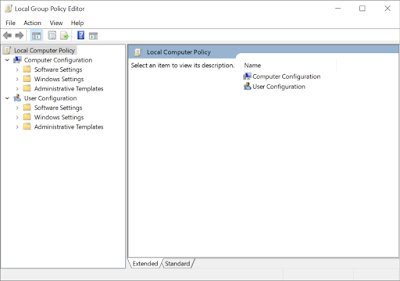
3. Run dialog box will pop-up,type gpedit.msc. This will open Local Group Policy Editor. (see pic 1 for reference)

4. Now, go to the following location and look for Local Computer Policy in the left pane.

5. Click on Local Computer Policy/Computer Configuration/Administrative Templates/System/Logon. (See Pic 2 for refrence)

6. Just double-click Hide Entry Points for Fast User Switching to bring up a dialog box to change Fast User Switching policy setting.

7. At the top, there are Not Configured, Enabled and Disabled options available. Selecting each setting will let you read its affect in Help section. To disable Hide Entry Points for Fast User Switching, just select Enabled from the list and click OK.

If you need to diable this option, you need to select Disabled from the list. Rest all process is same.

8. Once done, you will have to enforce this change made to Fast User Switching policy setting. To do so, close the Local Group Policy Editor and open the Run dialog box (Windows +R button). Enter the command “gpupdate /force“ and click OK. The policy will be updated and applied on all user accounts.

9. To re-enable Fast User Switching, just choose Not Configured in its policy setting dialog and apply the changes via gpupdate /force command.

Hope this helps setting up mutiple users to login on your PC.